


|
All for Gmail: handy Firefox extensions, best Greasemonkey scripts, some desktop tools and lots of useful tips. Take this Gmail thingie to another level. Enjoy FIREFOX EXTENSIONS
Gmail Search Extension - search your gmail account directly from the firefox search bar GcalQuickTab - toggle between gmail and google calendar with keyboard shortcuts GTDInbox - turns your account into flexible and feature-loaded ToDo-management service (GTD = Getting Things Done) GMail Manager - manage multiple GMail accounts right from your browser DragDropUpload - this handy extension lets you quickly attach one or more files to your emails by dragging them over the “Attach a file” link [update] CustomizeGoogle - removes ads, switches you from http to https, hides the spam counter, quick contacts box, invite box and forces fixed font [update] Better Gmail - integrates bunch of cool features, i.e. attachment icons, attachment Reminder, mail preview, filter assistant, label colors, macros, and saved searches [update] GmailSkinz - powerful firefox addon with lots of cool features: (Note: some users reported having problems with this addon)
Google Toolbar with Gmail search - Official Google toolbar featuring one-click Gmail search E-Mail Notifier Toolbar | Gmail Notifier - as titles say ‘…notifier‘ _ GREASEMONKEY SCRIPTS (What is Greaseamonkey?)
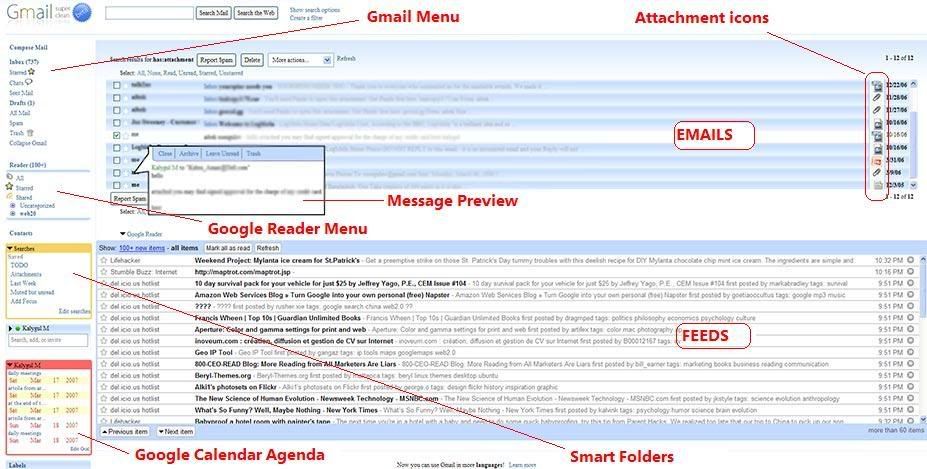
Gmail Spam-count Hide - hides spam count link GMail Attachment Icons - adds attachment icons to emails, letting you see what kind of attachment an email has (HTML,JPG, PDF….) [update: 'Attachment icons' isn't a standard greasemonkey script, it's an addon for a similar Firefox extension known as Stylish. However, installing it on greasemonkey should be fine as well] Google Reader Integration - integrates Google Reader into Gmail. Highly Recommended (demo) GmailTo - forces all ‘mailto’ links to open in GMail Saved Searches - lets you create ’saved searches’(aka smart folders) and display them in the separate box in the navigation menu. Clicking on a search executes the saved query. Demo Conversation Preview - handy addon that lets you quickly preview message contents right from the main inbox window. See demo below Google Calendar Integration - integrates Google Calendar agenda into Gmail. Demo Label Colors - lets you color menu labels to make them stand out better. Demo Gmail Macros - adds extra keyboard shortcuts to Gmail (i.e. “t” for move to trash, “r” for mark as read, “p” for mark as read and add to archive…etc). Read more [update] SSLGoogle - force google mail, docs and cal pages and their intra-links to a secure connection(HTTPS) [update] Gmail Encrypt - encrypts outgoing emails [update] Gmail Date Search - adds a Search by Date button to Gmail’s search form [update] Gmail Signature Float - moves your mail signature to the top of the message rather than the bottom Following image displays all above mentioned scripts in action(click to enlarge and open it in a new windows) _ Desktop APPS and Web TOOLS: GmailDrive (Windows) - adds a new virtual drive(’Gmail Drive’) to ‘My Computer‘ folder and uses gmail as its storage medium. Drag’n drop files Gmail Drive and it will store them on your gmail account as if on additional hard drive. More on GmailDrive [update] gDisk (Mac) - similar to above mentioned GmailDrive but for Mac users Gmail ToDo - handy desktop application that stores entered todo’s in a todo label on gmail Desktop Notifiers: GMail Notifier(official release from Google), GTray (Win XP), GCount (Mac), Gmail+Growl 2.0 (GmailNotifier addon that lets you further customize ‘new mail’ alerts) GMail for Mobile - access gmail from your mobile GmailFS - mountable Linux filesystem which uses Gmail as its storage medium Google Talk - Google’s IM service which is fully integrable with GMail You’ve Got Gmail - Gmail plugin for Trillian IM client Update: more notifiers: KCheckGmail(Linux), Notifier2(Win) TIPS and HACKS Unbl0ck - use this tool to access gmail from places where it’s blocked (work, school…) Gmail icon generator - creates an image of your email address to minimize spam exposure Gmail To Thunderbird - how to access your Gmail using Mozilla Thunderbird Shortcut List - handy, printable list of keyboard shortcuts for the Gmail Hotmail Contacts Import - explains how to import contacts from Hotmail to Gmail Gmail trick that explains how to find that ’someone’ who gives away your email address to spammers Attach any file type - bunch of tricks showing you how to attach and send blocked file types, i.e. ‘*.exe’ JimsTips - huge collection of basic gmail tips [update] What to do if your Gmail is nearly full? See here. [update] Secret keyboard shortcut for deleting messages. Check it out here [update] How to - import your archived emails into Gmail [update] How to - Backup Gmail your Gmail using Google Groups [update] How to - Re download gmail messages into outlook [update] How to - Work with Gmail Attachments (includes cool tips, Greasemonkey scripts and Firefox addons) Technorati Tags: gmail, firefox, greasemonkey, tips Enjoyed this article? Subscribe to MakeUseOf and get daily updates about new cool websites and programs in your email for free. Plus get free cheat sheets to your favorite programs. souce::http://www.makeuseof.com |
|




|
Bookmark this post:
|


|


0 comments